

Revolutionize Your Appointments with Sugar Calendar Bookings on WordPress
Tired of losing clients because your booking system is clunky, costly, or confusing?
Often, it’s because the booking form felt overwhelming, or your scheduling tool sent customers off-site to finish the booking — breaking the flow and costing you conversions.
Now imagine an appointment booking plugin that handles everything right within WordPress. That means you can manage time slots, payments, reminders, and custom workflows… without relying on expensive third-party tools.
That’s why I am excited to launch Sugar Calendar Bookings. It’s a full-featured, appointment-scheduling tool designed for small businesses and built specifically for WordPress.

Background Story – Why Sugar Calendar Bookings?
If you’ve ever tried adding an online booking system to your WordPress site, then you already know how frustrating the experience can be. Many service business owners start with tools like Calendly because they seem simple at first, but quickly, the problems become impossible to ignore.
These tools often slow down your site, create a clunky mobile experience, and send customers off-site to finish their booking… all of which ultimately hurts your conversions. Even worse, these tools also lock essential features like accepting payments behind expensive monthly plans, which just eat into your budget.
As someone who has run an agency myself, I knew this wasn’t good enough — not for small businesses, not for service providers, and not for WordPress site owners who depend on conversions.
That’s why I decided to build Sugar Calendar Bookings.
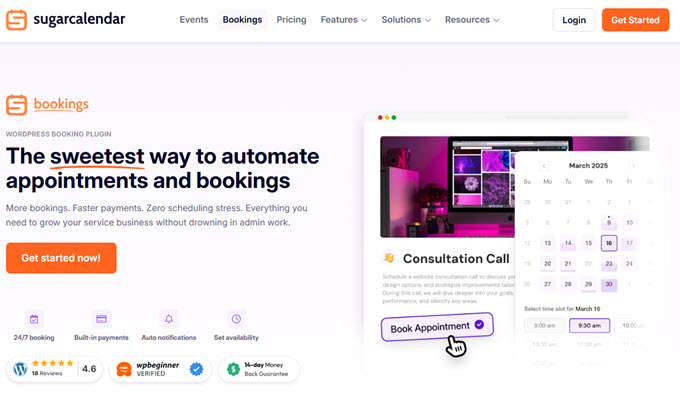
Sugar Calendar Bookings is a beautifully simple appointment booking and scheduling system designed specifically for WordPress.
It gives you everything you need to run your service business smoothly: 24/7 bookings, online payments, automated reminders, custom availability rules, cancellations, staff notifications, and a clean booking calendar — all inside your WordPress dashboard.
There’s no need for third-party accounts, no external booking pages, and no confusing setup. Customers book directly on your site, pay instantly, and receive automated confirmations — while you stay fully in control of your appointments, branding, and customer experience.
Key Features of Sugar Calendar Bookings
Set Up Your Services in Minutes
Sugar Calendar Bookings makes it incredibly easy to set up your services without any technical skills. You can add pricing, duration, and descriptions in just a few clicks, ensuring customers always know exactly what they’re scheduling.
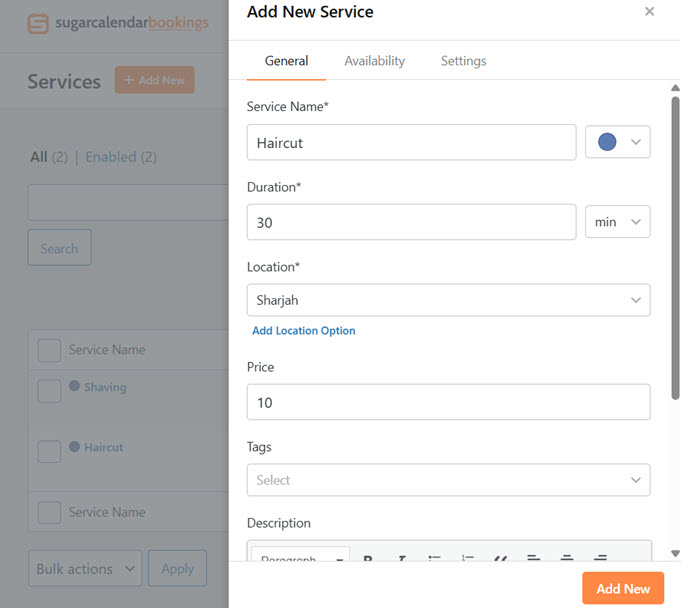
Simple, Beautiful, No-Code Booking Forms
With Sugar Calendar Bookings, adding a booking form to your WordPress site is quick and easy. Place it anywhere using WordPress blocks, shortcodes, or Elementor widgets.
Your customers get a clean, easy-to-use booking experience where they can pick a date, choose a time slot, and confirm their appointment seamlessly.
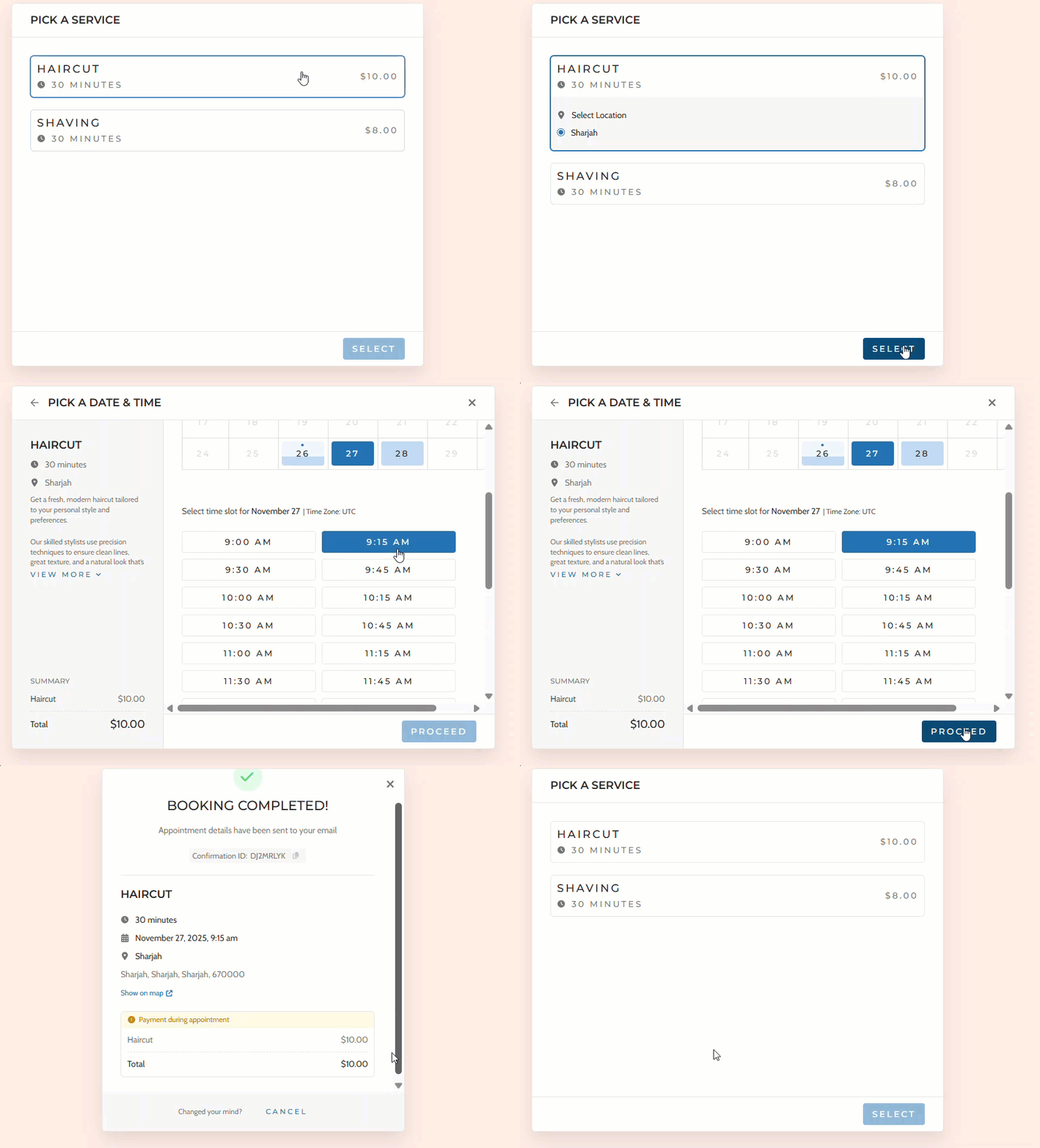
Flexible Scheduling That Fits Your Business
Your time is valuable, so Sugar Calendar Bookings offers full control over when customers can schedule appointments. Set business hours, block off holidays, add buffer times, and create rules for how far in advance clients can book.

Accept Payments Instantly or On-site
With Sugar Calendar Bookings, getting paid is seamless. Accept online payments through Stripe or allow customers to pay in person. Everything happens in one smooth flow—clients pick a time, complete the payment, and receive confirmation instantly.

Automated Email Notifications and Reminders
Sugar Calendar Bookings takes the stress out of managing appointments by keeping everyone informed automatically. When a customer books, changes, or cancels an appointment, both you and your team receive instant email notifications.
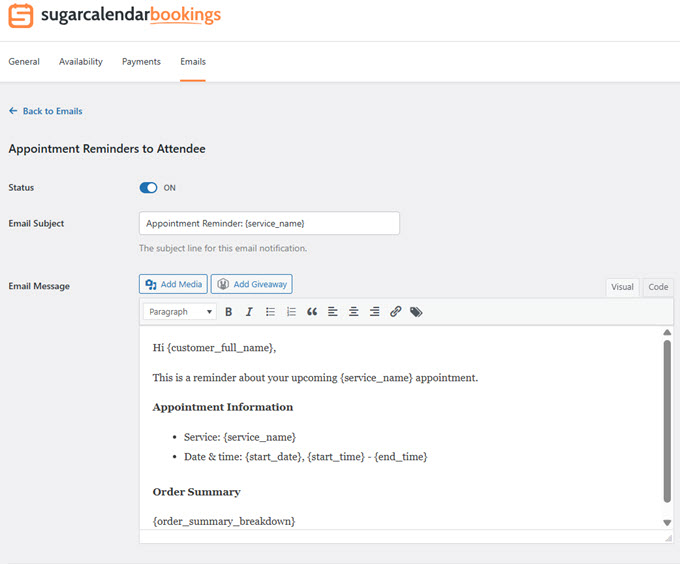
Your clients also get helpful reminders so they never forget their upcoming booking.
Keep Your Appointments Organized with the Built-In Calendar
Sugar Calendar Bookings keeps all your appointments neatly organized right inside your WordPress dashboard. Every new booking appears instantly on your calendar, complete with customer details, payment status, and the service they selected.
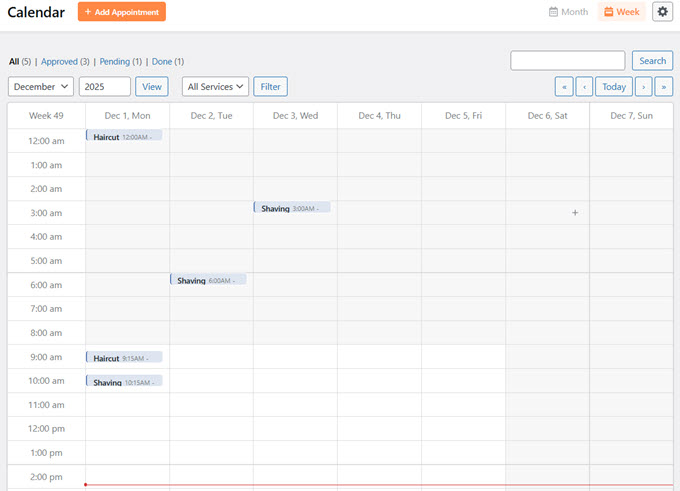
It’s a clean, simple way to manage your day that keeps everything centralized and easy to access so you always know exactly what your schedule looks like.
Built by the Team Behind Sugar Calendar
Sugar Calendar Bookings is built by the same team behind Sugar Calendar, the lightweight event calendar plugin trusted by thousands of WordPress users for its simplicity, speed, and reliability.
Our mission has always been to eliminate scheduling chaos in WordPress — starting with events, and now with appointments. Sugar Calendar Bookings gives service businesses a seamless way to accept bookings, take payments, and stay organized right within your WordPress site.
I’m incredibly excited about what this unlocks for small businesses, freelancers, agencies, coaches, clinics, salons, and anyone who needs a simple, powerful way to manage appointments.
If you’ve ever wished you could automate bookings, reduce no-shows, collect payments upfront, and deliver a frictionless scheduling experience on your website, then Sugar Calendar Bookings is the solution you’ve been waiting for.
Conclusion
Sugar Calendar Bookings is reshaping the way businesses handle appointments on WordPress. With functionalities like easy setup, customizable forms, flexible scheduling, and instant payments, it caters to the needs of modern service providers.
Whether you’re a freelancer or part of a larger agency, this tool ensures that your booking process is smooth and efficient, leaving you more time to focus on what truly matters: your clients.
Getting started is straightforward: add your services, set your business hours, customize your booking form, and start accepting appointments and payments 24/7. Explore the free version on WordPress.org before upgrading to experience the full benefits.
Frequently Asked Questions
1. What makes Sugar Calendar Bookings different from other booking plugins?
Sugar Calendar Bookings integrates seamlessly with WordPress, eliminating the need for third-party accounts. It offers a clean, user-friendly interface and ensures customers can book directly on your site without needing to go off-site.
2. Can I customize the booking form to match my brand?
Yes, you can customize your booking form using WordPress blocks, shortcodes, or Elementor widgets to match your brand’s look and feel.
3. How does payment processing work with Sugar Calendar Bookings?
Payments can be processed instantly through Stripe, with no need for complicated setups or external accounts. You also have the option to allow clients to pay in person.
4. Is Sugar Calendar Bookings mobile-friendly?
Yes, all booking forms created with Sugar Calendar Bookings are fully mobile-responsive, ensuring a smooth experience on any device.
5. Can I start using Sugar Calendar Bookings for free?
You can try the basic features of Sugar Calendar Bookings by downloading the free version from WordPress.org.
Thank you for choosing WPBeginner as your WordPress resource. I’m excited to see how Sugar Calendar Bookings will enhance your business’s scheduling needs.
Yours Truly,
Syed Balkhi
Founder of WPBeginner



0 Comments